Show several angles
The clip shows you from the front, from behind and in profile behind the wheel. The sample image packs a front view, a back view and three face close-ups into one picture, so the AI has all of them.
Put yourself in the GTA 5 farewell clip with one photo. On a sunset pier, the three leads hand you the new game and the keys to a pink-and-blue sports car, hug you goodbye and watch you drive away.
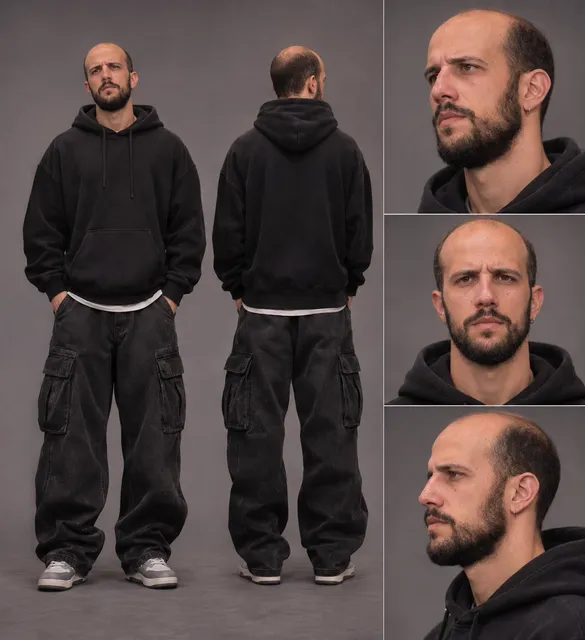
A full-body photo of the person being sent off; the sample adds a back view and face close-ups in the same image.
The farewell clip and the prompt are already set, so just pick a resolution.
Ready in about 10–15 minutes, with the music from the clip.
Good Bye GTA 5 AI is a farewell video trend on TikTok and Instagram Reels. In each clip, the person posting it stands on a sunset pier while GTA 5's three leads, Michael, Franklin and Trevor, hand over the new game and a set of car keys, hug them goodbye and watch them drive off.
It spread in the weeks before GTA 6's November 19, 2026 release. GTA 5 came out in September 2013, so many players have been in Los Santos for 13 years, and these clips are a way to close that chapter. They usually go up with captions like "Thank you for 13 years" or "Goodbye Los Santos".
Nobody films anything: the scene is AI-generated, and one photo is enough to put yourself in it. This template recreates it, so all you choose is who gets the send-off.
The clip runs 30 seconds and plays like a short film. It opens at sunset on a pier with a Ferris wheel, much like Los Santos' Del Perro Pier. Three men styled after Michael (in the suit), Franklin and Trevor hand you a PS5 copy of the new Grand Theft Auto, and Franklin dangles the keys to a pink-and-blue sports car parked behind you.
Then come the goodbyes: a hand on your shoulder, a long close-up of your face as it sinks in, and the car. You set the new case down next to an old PS4 copy of GTA 5, and the last shots show the three of them watching you leave along a palm-lined beach road.
The clip is AI-generated in the look of the game, not footage from GTA 5, GTA 6 or a Rockstar trailer. This template keeps all of it as it is (the pier, the three men, the car, the cuts and the music) and redraws only the young man as the person in your photo.
Yourself: the version of you who has played since 2013, getting a proper send-off before the next game.
A friend who never stopped playing: a gift for the one who still logs into GTA Online every weekend (ask first, it's their face).
Your crew or your channel: a streamer, a gaming group or a Discord server marking the move to GTA 6 with one shared video.
The clip shows you from the front, from behind and in profile behind the wheel. The sample image packs a front view, a back view and three face close-ups into one picture, so the AI has all of them.
The wide pier shots show you head to toe. With a face-only photo, the AI has to guess your outfit and build.
The farewell close-up stays on your face for several seconds. Use a sharp, well-lit photo without sunglasses, a cap or hands in the way.
If you are sending off a friend, use a photo they agreed to, especially if you plan to tag them.
FAQ
One. The clip has one person to recast: the young man who gets the game and the keys. If you want to show several angles, put them together in one image, like the sample.
Not with this template. It only recasts the young man; the three men, the pier and the car stay as they are in the clip.
Close, but not frame-perfect. Your face, hair and outfit come from your photo, and everything else comes from the clip. The outfit can rub off on the people around you: in the example, the black hoodie from the photo also shows up on the man in the white T-shirt in a few shots. How closely the face matches depends on the photo you upload.
The prompt describes the character as a young man and uses "he". If you upload a photo of a woman, change "he" and "his" to "she" and "her" in the prompt before you press Generate, so the instructions match your photo.
No. The clip is an AI-generated scene made to look like the game, and your video is AI-generated too. Nothing in it comes from GTA 5, GTA 6 or a Rockstar trailer.
The source clip is 30 seconds long, so it costs 90 credits at 480p, 210 at 720p or 600 at 1080p. The exact cost is shown on the Generate button, a video is usually ready in about 10–15 minutes, and failed generations are refunded automatically.
Not unless you choose to. Videos you make are private by default. If you make a video public or share it, it is shown in the public Community feed, together with the photos and prompt used to make it, and you can make it private again at any time. Deleting a video from your history also removes it from Community.
Yes, for personal posts. The video is landscape (4:3) with the music from the clip; post it as it is or crop it to vertical in your editing app. The characters, the Grand Theft Auto name and logo, the box art and the music belong to their owners, and this template does not give you the right to use them commercially. Rights holders can ask platforms to take posts down, and some platforms mute or flag copyrighted audio; if that happens, replace the sound with one from the platform's library. Turn on the AI-generated label when you post.
Only with their permission. Do not upload photos of people without their consent, and do not use the template to impersonate, harass or mislead anyone.
No. Genjutsu is an independent AI video tool and is not affiliated with, endorsed by or sponsored by Rockstar Games, Take-Two Interactive or Sony Interactive Entertainment. Grand Theft Auto, GTA, PlayStation and the character names belong to their owners and are only used here to describe the trend the template recreates.
Want a different trend? Upload any clip to the Genjutsu AI video generator and recreate it with your own photos.
Upload one photo and get the send-off the trend is about: the pier, the keys and one last drive out of Los Santos. No subscription needed.
Create My Goodbye Video