Show your shoulders and arms
The clip shows the person from the waist up with plenty of hand gestures, so a photo that shows your shoulders and arms transfers better than a tight face crop.
The viral Spanish freestyle clip from early October, with you at the center. Upload one photo and get your own version: no editing skills, no timeline.

Made from this photo
A well-lit, front-facing photo that shows your face and upper body.
The Bulin 47 clip, motion settings and prompt are already filled in.
Ready in about 10 minutes, with the original sound.
The Bulin 47 AI video trend started with a Spanish-language street freestyle clip that spread fast in early October 2026. Within days, people began posting AI versions in which someone else takes the place of the original performer: a friend, a partner or simply themselves, while the setting, the camera and the timing stay the same.
Search interest followed the same curve. Google Trends shows the phrase first appearing on October 6 and peaking on October 9, as more people saw the remixes and went looking for a way to make one of their own.
This template recreates that kind of moment: a red-lit night venue, a crowd and security around the main person, a fan filming on a phone and a photographer's camera right in the frame. The person from your photo becomes the center of it all, greeting the fan and the crowd just like in the original.
Most of the Bulin 47 remixes you see are made with video-to-video models that support motion transfer, not with classic face-swap apps. A face-swap app only replaces the face; motion transfer recreates the whole person, so the body, clothing and lighting fit the scene instead of looking pasted on.
This page uses Genjutsu, the same model behind Higgsfield Genjutsu. The template already contains the source clip and a tested setup, so all you add is your photo. You pay with credits, with no subscription, and if a generation fails the credits go straight back to your balance.
The clip shows the person from the waist up with plenty of hand gestures, so a photo that shows your shoulders and arms transfers better than a tight face crop.
Avoid sunglasses, heavy shadows and hands covering the face. The model keeps a likeness best when it can see the eyes and the shape of the face.
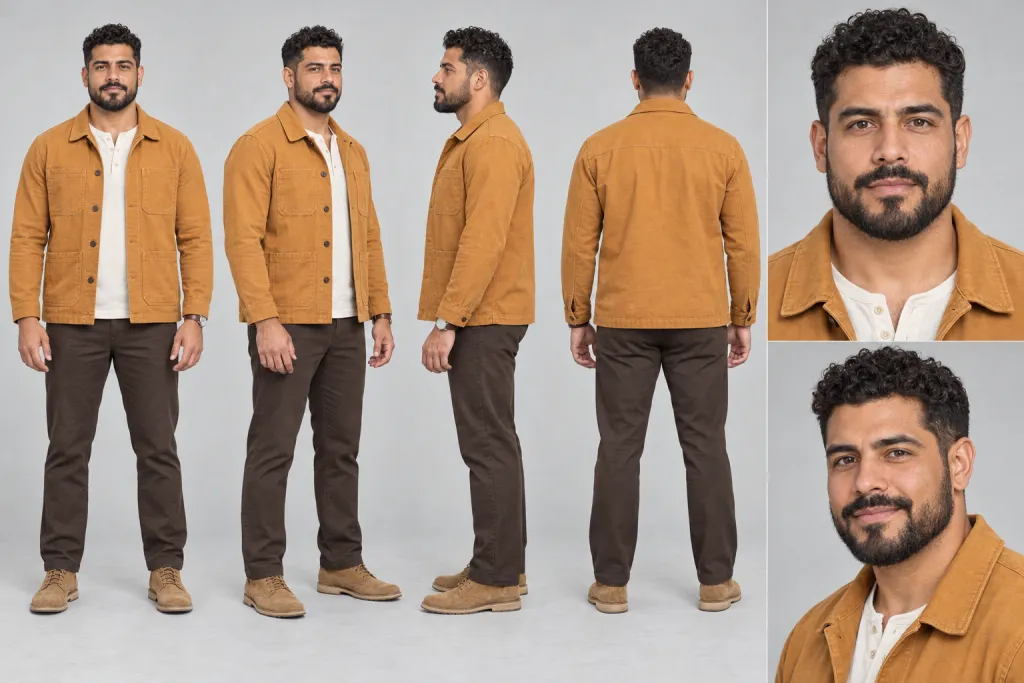
A reference sheet with front, side and back views, like the sample image, helps the model keep your likeness when the head turns toward the crowd.
Use a photo with only one person in it, so the model knows exactly who should take over the routine.
Run a low-cost 480p draft to check the likeness, then render the version you like at 720p or 1080p.
FAQ
Bulin 47 is the name attached to a Spanish-language street freestyle clip that went viral in early October 2026. The AI trend recreates that clip with other people in the performer's place.
Yes. One clear photo is enough. The template supplies the source clip and the motion, and Genjutsu renders you performing the routine.
The main person in the center, the one greeting the fan and the crowd. Everyone else, from the security to the fan filming on a phone, stays part of the scene.
Close, but not frame-perfect. Your face and hair, and your outfit when it is visible, come from your photo, while the moves and framing come from the source clip. The rest of the scene is rendered again too, so the people around you may look slightly different, and how closely the main person matches you depends on the photo you upload.
The template clip is 15 seconds long, so a video costs 45 credits at 480p, 105 at 720p or 165 at 1080p. The exact cost is shown on the Generate button before you start, a video is usually ready in about 10 minutes, new accounts get 50 free credits, and failed generations are refunded automatically.
Until you buy a credit pack, the videos you make are shown in the public Community feed, together with the photo and prompt used to make them. Once you have bought credits, new videos are private by default and you can switch any video between public and private. Deleting a video from your history also removes it from Community.
No. A face swap pastes a face onto the original performer. This template uses motion transfer: your face and hair, and your outfit when it is visible, come from your photo, while the moves come from the clip.
Only with their permission. Do not upload photos of people without their consent, and do not use the template to impersonate or mislead anyone. Adult content is not allowed.
Yes, for personal posts. The video is vertical (9:16) and keeps the sound of the original clip, but the clip and its sound belong to their owners, and this template does not give you the right to use them commercially. Many platforms ask you to label AI-generated content, so turn that label on when you post.
Want a different trend? Upload any clip to the Genjutsu AI video generator and recreate it with your own photos.
Upload one photo and Genjutsu recreates the freestyle with you in it. No subscription needed.
Create My Bulin 47 Video